v1.6.2 Now on Android TV

One app.
Every screen.

Stream anime in HD on your phone and your TV. Sync MyAnimeList and AniList, cast to the living room, and download episodes for the commute. No ads, no clutter.

Free, no ads Phone + Android TV Auto updates
2Platforms: phone and TV
MAL + AniListTwo-way list sync
1080pHD streaming
0Ads or subscriptions
What's new in 1.6

Rebuilt from the home screen up.

A new look, a new player, and anicore now runs on your TV. Here's what landed.

01 / REDESIGN

A fresh new look.

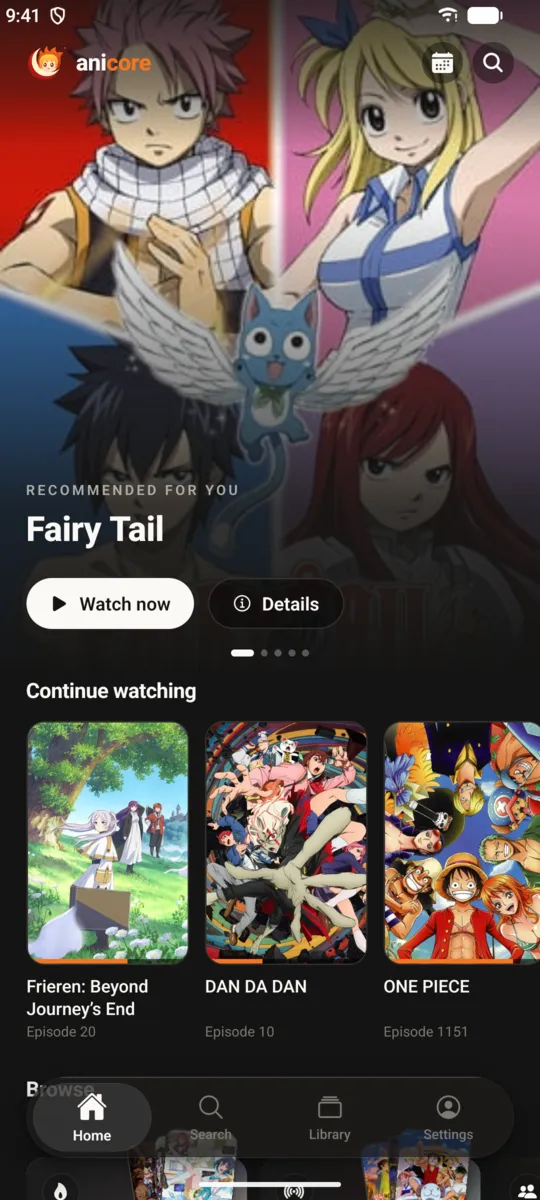
Home, details, player and settings were redesigned. Big artwork, a cleaner layout, and your shows front and center.

  • Recommended-for-you hero carousel
  • Continue watching with progress on every card
  • Browse by genre, season and top rated
anicore home screen with Fairy Tail featured and a Continue watching row
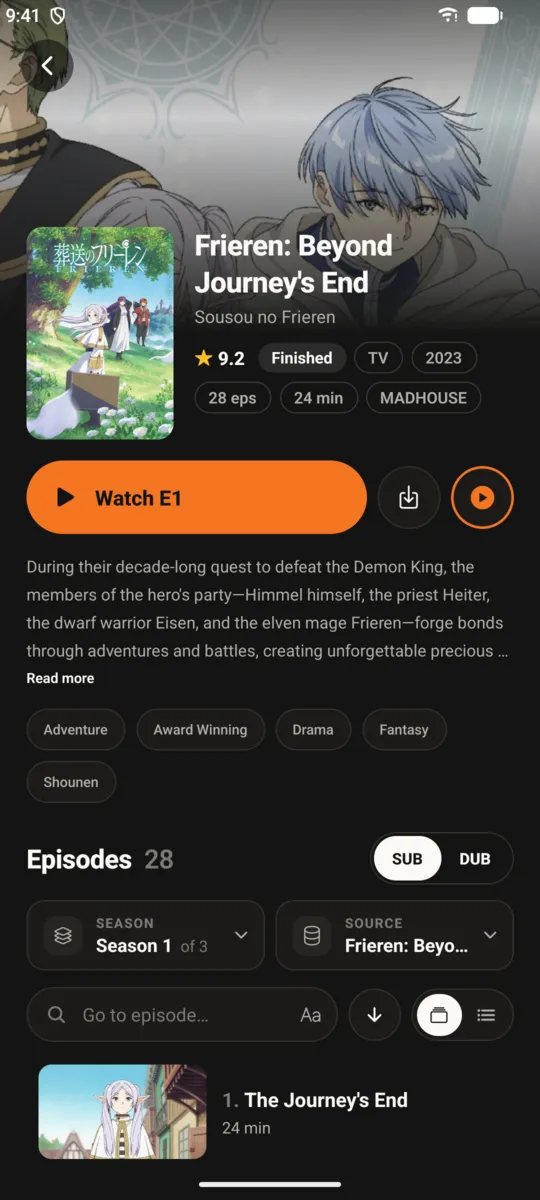
Anime details screen with synopsis and episode list
02 / PLAYER

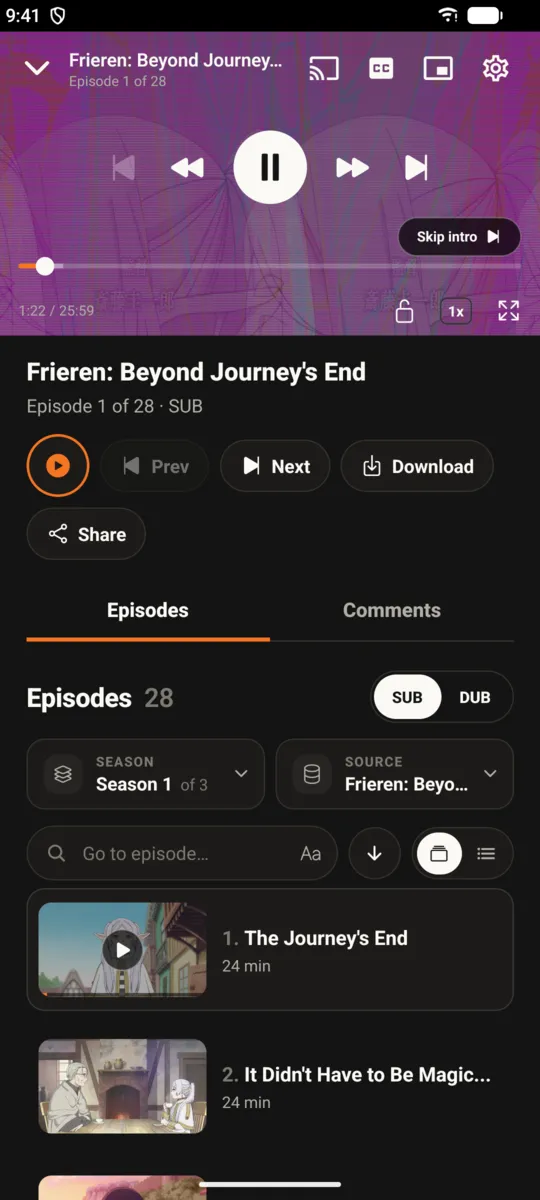
A player that gets out of the way.

Smooth scrubbing, picture-in-picture, and media controls in your notification shade.

  • YouTube-style picture-in-picture
  • Notification controls with previous and next episode
  • Subtitle styling and quality picker
Video player with playback controls and scrubber
03 / TRACKERS

Your lists, synced.

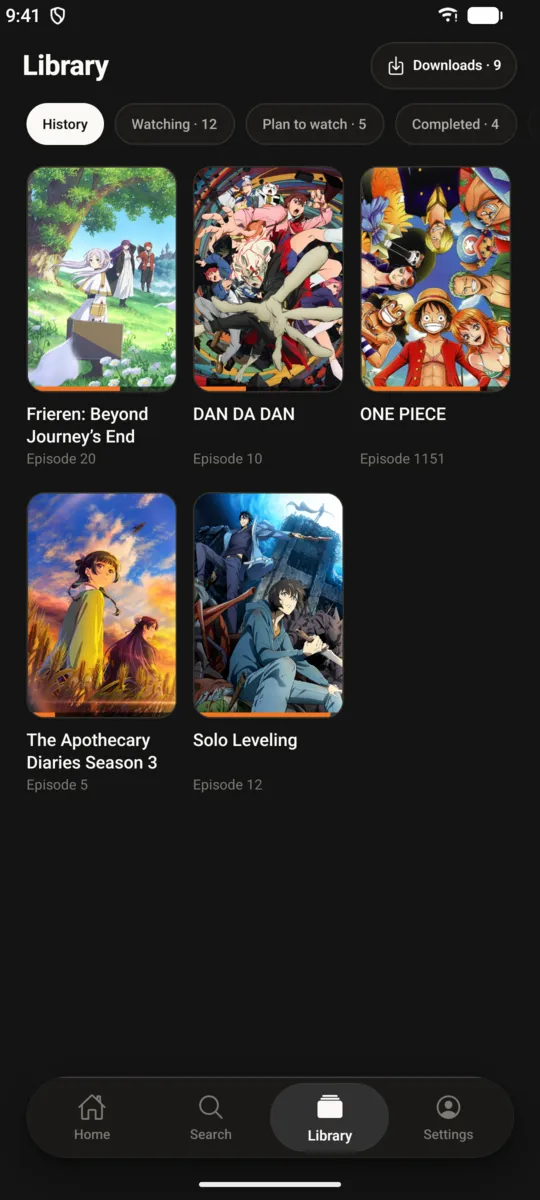
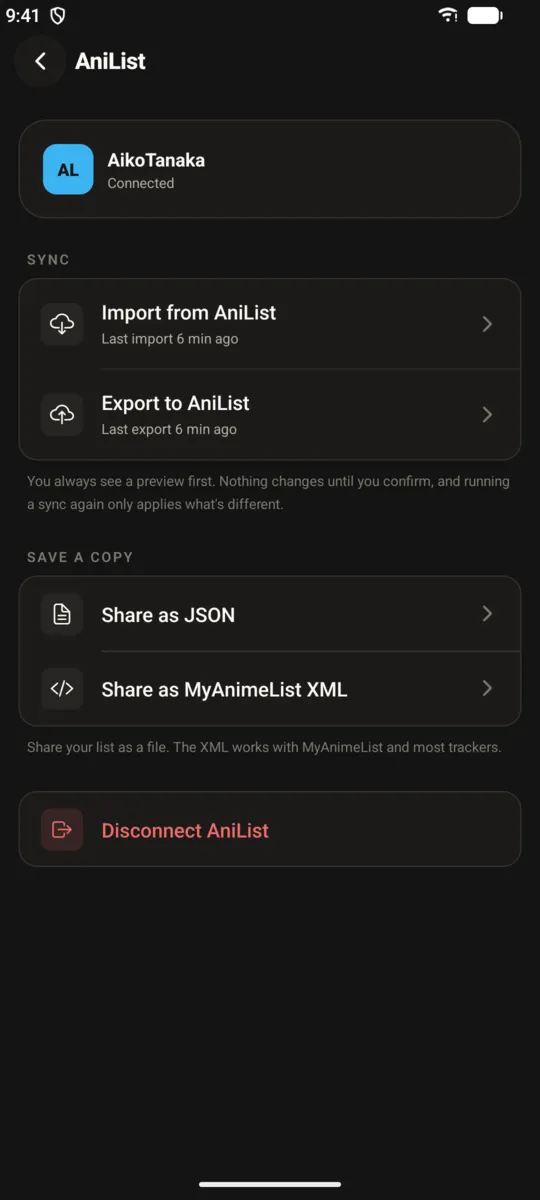
Connect MyAnimeList and AniList. Episodes you finish update your lists automatically, and your library follows you between phone and TV.

MyAnimeList AniList
Library screen with watching and planned lists
AniList connection screen
04 / OFFLINE

Download. Export anywhere.

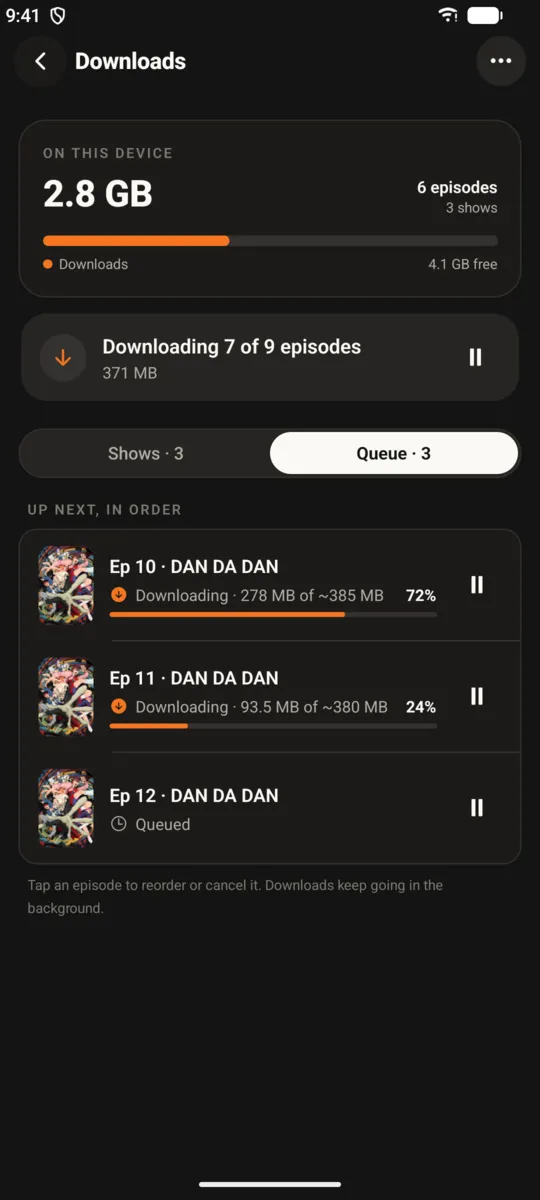
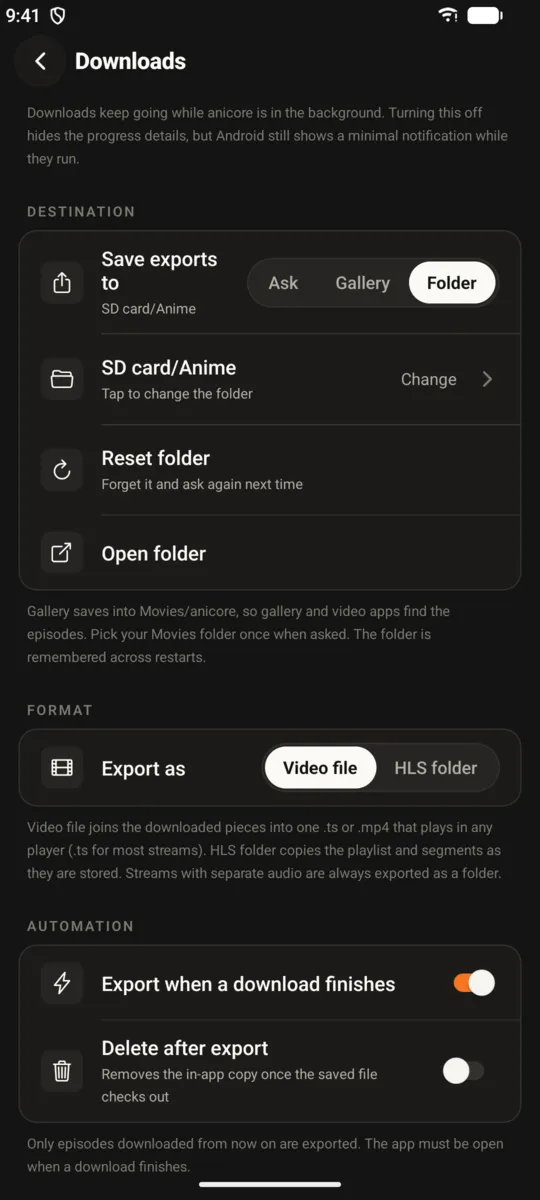
Save full seasons for offline viewing, then move them to an SD card or USB drive when your phone fills up.

  • Per-show downloads view
  • Export episodes to SD card or USB storage
  • Plays without a connection
Downloads screen listing saved episodes
Export dialog for moving episodes to external storage
New · Android TV

Built for the big screen.

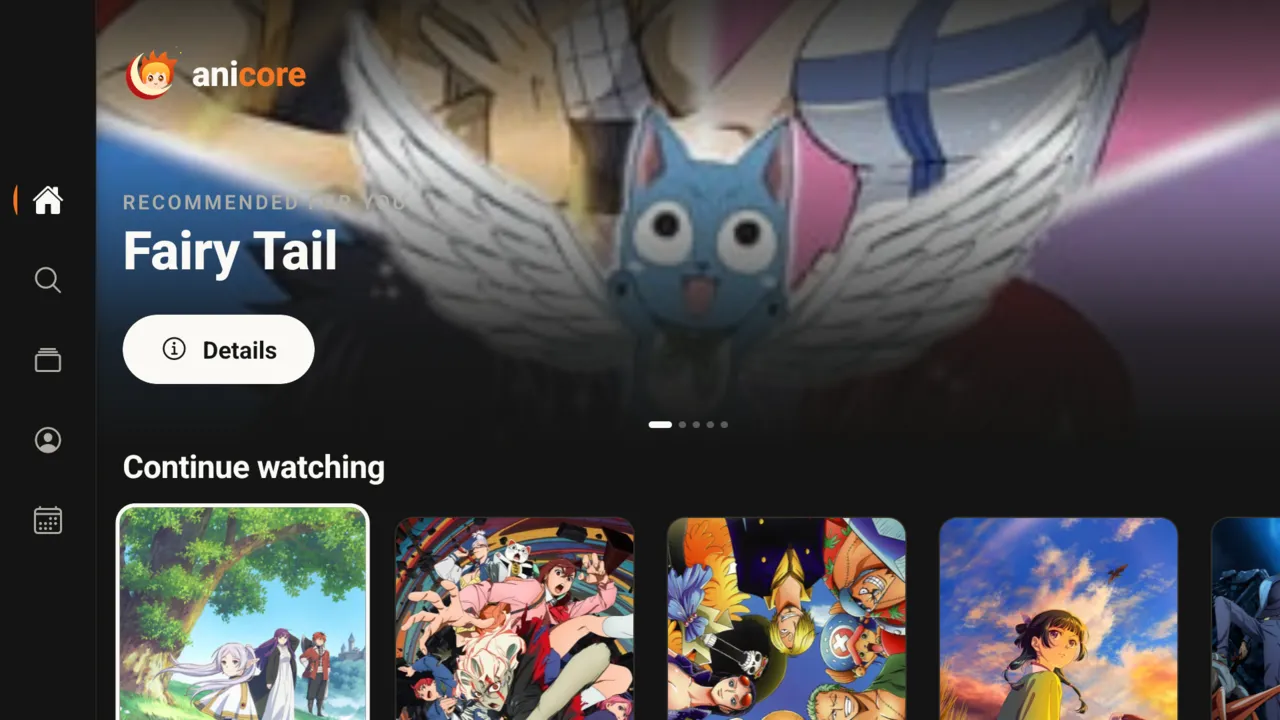
A dedicated TV app designed for the remote. Same library, same progress, made for the couch.

D-pad firstEvery screen works with a remote
Pick up anywhereStart on phone, finish on TV
Cast from phoneThrow an episode to the TV
Fire TV readyRuns on 32-bit and 64-bit sticks
anicore on Android TV: home screen with side navigation
And everything else

The details add up.

Cast and mirror

Send what you're watching to a Chromecast or Google TV right from the player.

Airing schedule

See what drops today and tomorrow, filtered to your list. Never miss your next episode.

Fast search

Find any show in a few keystrokes.

Always up to date

Small updates install in the background. Big ones prompt you in-app.

No ads, ever

No banners, no pop-ups, no subscriptions.

Download

Get anicore.

Pick your device. Both builds are free and come from our official GitHub releases.

Phone & tablet

Android

Phones and tablets.

  1. Tap download and open the APK.
  2. Allow "install unknown apps" if Android asks.
  3. Tap install. Done.
Download for phonePhone · APK
New · TV

Android TV

Google TV, Android TV, Fire TV, Nvidia Shield.

  1. Install the free Downloader app on your TV.
  2. Enter the link from the button below, or this page's URL.
  3. Allow Downloader to install unknown apps, then install.
Download for TVAndroid TV · APK

Looking for older builds or release notes? All releases on GitHub

FAQ

Questions, answered.

Is anicore free?

Yes. anicore is free to download and use on phone and TV, with no ads and no subscriptions.

Which file do I need, phone or TV?

Use the phone APK on phones and tablets. Use the TV APK on Android TV, Google TV and Fire TV devices. The TV build is laid out for a remote and shows up in your TV's app launcher.

How do I install the TV app?

Install the free Downloader app from your TV's store, enter the TV download link, then allow Downloader to install unknown apps when asked. You can also copy the APK to a USB drive and open it with a file manager.

Does my progress carry over between phone and TV?

Yes. Sign in on both devices and your library and watch progress sync, so you can start an episode on your phone and finish it on the TV.

Can I sync with MyAnimeList or AniList?

Yes. Connect either account in settings. Finished episodes update your list automatically.

Can I watch offline?

Yes. Download any episode and it plays without a connection. You can also export downloads to an SD card or USB drive.

How do updates work?

Small updates install in the background and apply the next time you open the app. When a bigger update needs a new build, the app prompts you to download it.

Something isn't working. Where do I report it?

Message us on Telegram with your device, app version and what happened. Screenshots help a lot.

Community

Join the crew.

Release news, recommendations, and help from other fans.

Your next episode is waiting.

Free on Android phones and Android TV.

Download anicore